

If the first few months of 2020 has demonstrated anything, it’s that you never know where the next black swan will land. Over the past 20 years, we’ve seen a black swan take out the technology sector, killing the stock market; a black swan take out the U.S. housing market, killing the stock market; and a black swan masquerading as the coronavirus, again taking out the stock market.
The common denominator here is “taking out the stock market.” And that means it’s up to us to learn how to take back control of our own lives, of our lifestyles, and our personal happiness.
Retirement once was built on the three-legged stool of Social Security, personal savings, and company pensions. But pensions, we all know have basically vanished, and these black swans keep undermining our personal savings. This means if we want to shore up the stability of our retirement finances, we need to bolt a new leg onto the stool. And that new leg is our ability in the technology age to exploit the gig economy to our own benefit.
No matter your skill set, no matter what you do now or did in the past, there is an option that will align with your own skills and passions. And to help you choose which income stream might be best for you, we’ve put together a list of 50 ways expats have found to make money in retirement.
Read on as we share how you can make your dreams of making money anywhere come true.
Sell Your Photos
With the widespread availability of low cost, high-grade digital cameras, photography has become a way to earn an income that’s within the grasp of people who don’t want to make a significant financial investment, or who don’t have a specialized qualification or background.
Stock photography websites are huge repositories of photographs, covering almost every possible subject you could imagine. Photographers from around the world simply upload their images to any one of a number of these huge databases, allowing magazine editors, designers, or practically any organization with a website to buy them.
The beauty of stock websites for photographers is that once they’ve uploaded a photograph, it can be sold any number of times, to different people, meaning that it can continue to make you money in the background, again and again, without any more effort on your part.
Create “How To” Videos
In recent years, YouTube has grown into the go-to source for all manner of video courses and guides. Instructors can monetize their videos by charging a subscription fee or password protecting content for paying customers only.
It’s not enough to simply know your niche area. You also need to know the exact phrases that people search for. To find potential search phrases, start typing “how to [your topic]” into YouTube’s search bar and notice what phrases are generated in the auto-fill drop down. Make sure to use the same keywords when you write your video title, description, and tags.
Once you have a loyal and engaged following, you can start partnering with brands that will pay a fee to have their product mentioned or reviewed.
Get Paid to Enjoy Luxury Trips as a Travel Writer
To make money as a travel writer you must be able to sell your articles. And there are thousands of magazines all over the world that will take them—both in print and online. Finding these publications takes some research starting out, but it pays off big dividends down the road. Thankfully, the internet has made this process so much easier for writers.
Once you’ve researched a publication and read back articles so you’re familiar with the sort of content they publish, check the website for writer’s guidelines—most publications have them posted. These are instructions from the editors to freelance writers.
Just remember that if there’s an aspect of travel that you’re interested in, then there’s probably a whole community of people with the same interest, as well as a plethora of publications that cater to them.
Become an In-Demand Copywriter
If you’ve ever dreamed of being able to live and earn a great income no matter where you decide to move to overseas––maybe in a house by the sea in Latin America, an historic European city, or even on a Greek island for a summer…
Then copywriting could be ideal for you.
Copywriting is a mega-industry, ripe with opportunity. And yearning for people who can fuel it with fresh marketing messages and one of the best benefits of the freelance copywriter’s lifestyle is that you can get paid in U.S. dollars…yet live virtually anywhere in the world. That includes all those countries with a super-low cost-of-living.
7 Incredible Housesits for a Bucket-List Vacation
7 Incredible Housesits for a Bucket-List Vacation
Whether you want to explore retirement destinations like Portugal, Mexico or Costa Rica… see more of your own country… or have a vacation and save money… Housesitting allows you to have the lifestyle experiences you want—often for less than it costs to live at home.
Discover 7 Incredible Housesits and amazing destinations in our daily postcard e-letter. Simply enter your email address below and we’ll send you a free special report – Your Trusted Guide to 7 Incredible Housesits Where You Could Enjoy a Bucket-List Vacation
By submitting your email address, you will receive a free subscription to IL Postcards and special offers from International Living and our affiliates. You can unsubscribe at any time, and we encourage you to read more about our Privacy Policy.
Teach English

If you’re a native English speaker, you may not realize it, but you already have the number one qualification you need for a fun, portable income that can hand you a steady pay check from anywhere in the world.
English teachers are in huge demand! Did you know…• There are more people on the planet who speak English as a second language than those who speak it as a first.• More than two-thirds of the world’s scientists read English.• 80% of the world’s electronically-stored information is in English.• More than 1 billion people are learning English today.
All of that means huge opportunities for English teachers. Teaching English as a foreign language jobs are available in virtually all countries where English is not the first language. You’ll be surprised at how far your native language can take you.
Turn Your Interests Into a Podcast That Pays
Podcasting doesn’t have to be complicated. A simple microphone, a laptop, and free recording software, plus some low-cost hosting, will get you up and running. Assuming you have a laptop, your biggest start-up cost is a good microphone.
Podcast shows don’t need to run every day, and they typically work better when they’re kept relatively short. One episode a week usually works best. And because it’s not broadcast live, all the episodes for the month can be recorded in one afternoon. You should create something a listener can easily consume while commuting to and from work.
There are a number of ways to make money from your podcast. The most obvious is through commercial sponsorship, but you can also use it as a platform to advertise your own products or services.
Open an Art Gallery
No matter where you plant roots in this great, wide world, you’ll find expats with a desire to try their hand at artistic expression. Perhaps you are one yourself. What you might not find in your new overseas home are businesses that showcase art…or studios that have art classes and retreats.
Herein lies an opportunity, especially in towns where tourists frequent, and expats live, but which lack museums, galleries, and other opportunities for appreciating art. You can sell your own work, showcase other artists, and even combine your gallery with a complementary business such as a café, restaurant, or gift shop for an additional source of income. You can teach classes or host retreats…there are many possibilities.
Open a Café
Coffee’s prevalence has created a thriving worldwide industry, and there are ample opportunities to leverage that popularity to fund your life overseas. Whether you see yourself overseeing a few acres of coffee farm, or bringing the perfect cup of joe to a new community, there’s profit to be made from this valuable little bean.
One of the easiest ways to make a profit with coffee—and for coffee lovers to enjoy a satisfying and fun endeavor—is to open your own coffee shop.
Enterprising expats have found that there is an untapped demand for certain Western café offerings. For example, a growing number of tourists and expats in Asia are looking for European- and American-style coffee like espresso, cappuccino, and latte, as well as classic American foods and desserts.
Set up a Consignment Store
Consignment shop owners face stiff competition in North America, but in many other countries these kinds of bargain outlets are few and far between.
Setting up a reselling business has many advantages. Financial risks are low as the investment doesn’t include buying stock, and you can easily test your market with a “pop-up” store—running for just a week or two—before signing a commercial lease or even buying property.
Become a Tour Guide

When you love to travel…explore new cultures…dine out and see the sights, it’s only natural that you want to share that. Maybe you want to show friends around your new country or take family members on a trip to your favorite destination.
If that sounds appealing, you have a potential business on your hands that’s easy to set up and run…tour guiding. Your tour guiding business can take different forms, from walking tours to excursions.
Consider Ecotourism
Savvy locals and expats have been cashing in on the tourism industry for years, especially in regard to ecotourism. With an increasing number of folks showing interest in responsible traveling and a desire to learn about the native environment of a place, ecotourism has exploded in popularity.
Hairdressing
If you’re moving overseas with skills that already exist in your new home, don’t assume you won’t be able to compete with local prices. You might be pleasantly surprised by the level of expat demand for expat services—even if locals also do the job.
So, if you’re toying with the idea of packing your comb and scissors and heading to warmer climates, you may be in luck. Find a strong expat community… in lush, highland towns…bustling beach resorts…or even vibrant cities, and you’ll tap into a ready market.
Health and Wellness Skills Pay Overseas
Wellness…fitness…natural healthcare…they have a following all over the world. You’ll find a market for yoga classes in Italy, clients for massage therapy in Ecuador, and regulars at gyms from Asia to Mexico.
If you have experience in wellness and fitness, even just as a longtime participant, it’s not a huge leap to become a teacher, trainer, or therapist overseas.
There are all sorts of ways to run your business. You could rent a small room for treatments or buy or lease a location—and invest in equipment—for a gym. You can organize yoga retreats anywhere in the world you choose… or you can be the person who makes your studio available to visiting retreat groups.
In any case, you’re likely to find it less expensive to set up the business overseas. Sidelines in nutrition, aromatherapy, or consulting can generate additional income.
Set up a Rental Business
You don’t want to lug bulky equipment with you on vacation… and neither does anyone else. That’s why there’s opportunity for expats to set up rental businesses in top destinations worldwide. If you want to live in a place where people take vacations—sunny, beach resorts or bustling, tropical cities—getting a slice of the rental action could be your ticket to income.
Surfboards, baby strollers, scooters, motorbikes…there’s a market for them all.
Become a Wedding Planner

From Cancún to Tulúm, shiny limos, filled with wedding parties dressed in formal wear, can frequently be seen loading and unloading from hotels, restaurants, and resorts on most evenings.
So what do you need to set up as a wedding planner? Energy and patience are high on the list. But if you love to organize details and enjoy the fuss and frills of a wedding, this could be the perfect opportunity for you in the right destination.
Training and certification classes are available, primarily online, but the best way to become a wedding planner is through experience.
Rent Your Space
There are many websites that allow you to monetize your spare room, or whole apartment, advertising it to travelers from around the world. But renting your space can be more than just a much-needed extra income boost. It can also be a great way to meet people from all over the world.
You just need to keep a few things in mind. It’s important to have a location that offers some direct benefit to the visitor. It should be close to public transport, historical sites, or offer a great view. You also should decide whether you want to rent out the whole place, or live in it and rent out rooms. Being a live-in host is a full-time job, but if you have the energy and you love looking after people, it can also be great fun. Examples include Airbnb, VRBO, and FlipKey.
7 Incredible Housesits for a Bucket-List Vacation
7 Incredible Housesits for a Bucket-List Vacation
Whether you want to explore retirement destinations like Portugal, Mexico or Costa Rica… see more of your own country… or have a vacation and save money… Housesitting allows you to have the lifestyle experiences you want—often for less than it costs to live at home.
Discover 7 Incredible Housesits and amazing destinations in our daily postcard e-letter. Simply enter your email address below and we’ll send you a free special report – Your Trusted Guide to 7 Incredible Housesits Where You Could Enjoy a Bucket-List Vacation
By submitting your email address, you will receive a free subscription to IL Postcards and special offers from International Living and our affiliates. You can unsubscribe at any time, and we encourage you to read more about our Privacy Policy.
Try Housesitting
If you are considering an overseas move, housesitting is the perfect way to judge whether a culture, region, or country is a good fit for you.
There is a housesitting opportunity to fit almost any lifestyle change you may be considering. The beauty of housesitting is that it is an exchange. You bring the best of yourself, and the experience receives you and pays you back in unimaginable ways.
Housesitting assignments are as diverse as the people offering their homes. Some are free in exchange for property responsibilities, such as pets and gardens. Some opportunities require payment for utilities. Others may pay a small salary for varied tasks such as booking customers in the off-season or making the occasional meal at a B&B.
Set up a Camp or Retreat
With a growing number of vacationers seeking a break focusing on a specific theme or activity, the market for venues hosting retreats, camps, or workshops is on the increase. All sorts of themes are possible…natural healing… team building…painting…dance…weight loss…writing…winetasting…self-improvement…yoga…and so on.
Attendees get to step away from their everyday routine to learn a skill, engage in an interest or treasured hobby, express themselves in a new art form, or improve their life in some way.
Develop Suncream & Skincare Products
In the tropics, the sun can be very hard on your skin. Even if you don’t burn, UV rays are damaging your skin underneath the surface, which can cause premature aging and skin cancer. For those who spend a lot of time outdoors this can be especially concerning. Take surfers. They spend hours in the water in direct sunlight.
But sunscreen is not only for surfers. Anybody involved in water sports, boating or fishing, or even just spending the day at the beach is a potential customer.
Set up a Content and Web Development Business

As an aspiring web and content development freelancer, you should first develop your own website to showcase your skills. The experience of putting it together will tell you whether or not you enjoy it enough to do it for others.
There are many great online tools out there that make developing beautiful websites a snap without getting too technical. Examples include WordPress, Wibly, and Joomla for web design.
Become a Translator and Interpreter
Anywhere you find expat communities or tourist haunts—and where English is not the first language—you’ll find a need for interpreting and translation services.
Interpreter services are in more demand in countries where few residents have lived abroad in English-speaking countries or whose language is difficult to learn. Working as an interpreter in China, for instance, might be more lucrative than in Latin America.
Translators are more likely to make a profit in places with more established bilingual communities. That’s because long-term residents (both foreigners and locals) start businesses, run organizations, and interact with each other on an ongoing basis. These are places where folks are willing to invest in good translation and where a translator can build a clientele.
Try Farming & Live Off the Land
Farming can be one of the most fulfilling lifestyles you can embark on. But many might dismiss it as too much hard work, or too expensive to get started. In the heavily industrialized, heavily regulated U.S. that may be true. But overseas there are opportunities and options that will make it easier than you think to live off the land…and you can make a tidy sum while you’re at it.
Perhaps you’d just like a veggie patch, enough to feed the family and bring in a little extra cash at the local farmers’ market. Or maybe you see yourself overseeing a large acreage of land, churning out big profits. How about a farm that looks after itself, and you only visit on weekends?
Try Dropshipping
Dropshipping is a method of retail where the seller doesn’t actually have a physical inventory of the items they sell. Instead, when a customer makes an order, you purchase the item from a third party, and they ship it directly to the customer. This means you’ll never have to fork over a single dime to store your products or maintain your inventory. And you’ll never have to buy products in bulk, hoping to sell enough to recoup your investment.
Dropshipping eliminates some of the biggest expenses and hassles of doing business online. And it makes getting started in ecommerce possible with a much lower investment. This method can work in conjunction with your own ecommerce website, as well as online selling platforms like eBay or Amazon.
Help Others to Settle In
When expats first arrive overseas they often need help with simple tasks—such as, opening bank accounts, registering vehicles, obtaining a driver’s license and cell phone services, signing up for healthcare programs, or registering for their retiree
discount card. And while it’s possible to do all of these things on your own, a facilitator can make the whole process a lot easier.
You could specialize your facilitator service—focusing primarily on visa processing, for example—or you could offer a broad range of catch-all services. For example, many will need furniture, and without Spanish language skills, they’ll need your assistance in the purchasing process. Not everyone will want this specific service but if you’re familiar with the most common requests, you can offer a custom-built service to cater every customer.
Join the Craft Beer Revolution

Over the last decade, there has been a revolution in the beer industry. Beer drinkers have increasingly sought out alternatives to mainstream lager beers, and embraced small-batch craft beers—flavorful brews inspired by Old World recipes and experimentation with ingredients. The United States were the first to ride this new wave of craft beer. Then Europe.
Now craft beer has made its way to South America, where the scene has exploded in only a few years, with numerous microbreweries popping up in countries like Peru. They’re winning awards and winning over customers…creating a legitimate craft-beer scene enjoyed by locals, expats, and tourists.
7 Incredible Housesits for a Bucket-List Vacation
7 Incredible Housesits for a Bucket-List Vacation
Whether you want to explore retirement destinations like Portugal, Mexico or Costa Rica… see more of your own country… or have a vacation and save money… Housesitting allows you to have the lifestyle experiences you want—often for less than it costs to live at home.
Discover 7 Incredible Housesits and amazing destinations in our daily postcard e-letter. Simply enter your email address below and we’ll send you a free special report – Your Trusted Guide to 7 Incredible Housesits Where You Could Enjoy a Bucket-List Vacation
By submitting your email address, you will receive a free subscription to IL Postcards and special offers from International Living and our affiliates. You can unsubscribe at any time, and we encourage you to read more about our Privacy Policy.
Start a Tutoring Service
Establishing your own tutoring service can be a lucrative business that provides you with a comfortable and flexible lifestyle. The best part of all, you can set up a tutoring business in almost any country in the world.
Once you’ve got paying clients, there are a few key strategies you can use to keep them. You can start by offering discounts to long-term clients who promote your business to family and friends. Word-of-mouth marketing is still one of the most valuable marketing tools you can have when starting out.
Become a Freelance Proofreader
Most agencies will pay around 25% of the price of a translated document to a proofreader. Agencies charge about $75 for the translation of a five-page standard business document. So proofing the same document—which takes about an hour— pays out about $18 to $20.
A five-page document would be about an hour’s work. Your willingness to take on assignments will determine how much money you make. Some proofreaders work full time, some part time, and some round the-clock.
Shoot Some Video
As a travel videographer, you’ll journey to exotic locations, experience dream vacations, and stay in five-star hotels… free of charge…in fact, you’ll be paid handsomely to do it.
Getting set up is easy and more affordable today than it’s ever been. These days, most digital cameras, smartphones, and tablets have high-quality video capabilities, and you can buy a good handheld video camera for about $400. For editing you can use can use iMovie on a Mac and Windows Movie Maker on a PC. Both programs are free to download.
If You Can Type…You Can Travel
Transcribing is relatively simple: listen to an audio file through headphones—in this case, it was voice memos recorded by a lawyer—and type them out.
As a transcriber, your pay is directly related to how fast you type. Transcription jobs are paid by the audio hour (the length of the audio file), rather than by the hour worked. The time spent on a transcript is influenced by the audio quality, background noise, the accent of the speaker, and the speed at which people speak.
The average transcriber (who types between 75 and 100 words per minute) will complete one audio hour in four hours worked.
Start a Food Truck Business

Food trucks have exploded in popularity both in the United States and Canada. And the concept has found some traction in other parts of the world. The buzz is starting to grow among locals and expats alike thanks to pioneering food truck owners in countries like Costa Rica.
Even skeptical local officials are starting to see merit in this business model and regulations that restrict the movement of food trucks are starting to change. It’s the perfect recipe for a rising trend. And there’s still plenty of room for newcomers to this industry.
Set up a Medical Tourism Business
As a dental tourism concierge, you work with patients from the U.S. and Canada, help them liaise with the dental team, and plan their trip. Selecting the right dentist or dentists will be absolutely crucial to your success. You work closely with the dental team on scheduling and treatment options, so you can clearly communicate with the patients before they arrive and throughout their stay.
Typically, you receive 10% of the patient’s dental bill for your services, but that’s something you should negotiate with your dental partner.
While a medical tourism business can succeed in any number of the now-expanding centers for medical tourism across the globe, an essential key to success is to select a destination that is already popular with travelers, either for medical tourism or for recreation.
Mexico, Costa Rica, Malaysia, and Thailand are all big players in this rapidly-expanding industry with well-established medical tourism centers. Wherever you choose to set up your medical tourism business, a city close to an airport is a must. Patients don’t want to travel six hours on a bus for their procedures.
Create a Money-Making Blog
Get specific with your topic, and think about your unique perspective. There are tons of generic travel blogs, but what do you have to offer to set yours apart. Is it luxury travel or budget travel? Do you have expertise in or live in a specific location? Can you share advice about activities you do while traveling, like hiking or shopping?
The more specific you get, the easier it’ll be to attract an engaged audience and to earn money with your site.
Open a Secondhand Store
Vintage clothing boutiques…antique shops…thrift stores… In some form or another, the secondhand store has been around for decades. These stores became a common feature in most U.S. cities during the early 20th century, as the production of textiles and clothing exploded.
Today, secondhand stores have hit something of a wall in the U.S. But overseas, there are places where the possibilities of secondhand retail has never been fully explored, representing opportunity for fashion-savvy expats.
Overseas Publishing for Fun and Profit
In some of the world’s most desirable destinations expats are enjoying a good living publishing English-language magazines.
Sites like TripAdvisor are useful but lack true local knowledge and up-to-the-minute details on events and happenings—which is what locals, expats, and travelers are clamoring for. Expats have created publications to fill that need—whether it’s online or printed—and you could fund a laidback lifestyle overseas doing the same.
Run an Ecolodge
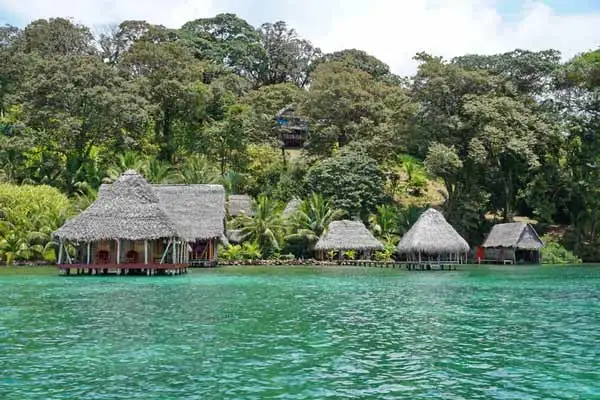
In countries all around the world, expats have discovered the joys—and profit—of running an ecolodge. They’re taking advantage of a growing trend in ecotourism to fund their peaceful, nature-filled lives overseas—and they’ve discovered some of the most affordable, breathtaking destinations to do it.
Ecolodges are something of a niche within the tourist sector. They are usually located in destinations that are off the beaten track and cater to tourists looking for nature focused, environmentally friendly vacations.
Ecolodges have potential in countries all over the world; essentially, any place that offers attractive natural settings and is reachable by transport.
Set up a Dive Business
There are several credentialing agencies and organizations with which dive operators choose to affiliate. The most popular are PADI (Professional Association of Dive Instructors), SDI (Scuba Diving International), and TDI (Technical Diving International)—each takes a slightly different approach to the sport and varying credentialing processes. All are well regarded in the industry.
Not all dive shops are the same. As a dive shop owner, you could conduct training and certification for divers, offer guided underwater excursions, explore the depths of underwater caves and caverns, and even take folks on night dives.
Provide Home-Cooked Meals
In fair-weather, low-cost destinations throughout Latin America and the Caribbean, expats and vacationers— especially those in small towns—have a tough time tracking down ingredients to cook their favorite foods from back home. Because of this, they find themselves dining out more than they like. And while restaurants are much more affordable in these locales, it can still get expensive over time.
If you have a passion for food or love cooking or baking, you can make good money helping these folks out, serving up simple, handcrafted meals.
7 Incredible Housesits for a Bucket-List Vacation
7 Incredible Housesits for a Bucket-List Vacation
Whether you want to explore retirement destinations like Portugal, Mexico or Costa Rica… see more of your own country… or have a vacation and save money… Housesitting allows you to have the lifestyle experiences you want—often for less than it costs to live at home.
Discover 7 Incredible Housesits and amazing destinations in our daily postcard e-letter. Simply enter your email address below and we’ll send you a free special report – Your Trusted Guide to 7 Incredible Housesits Where You Could Enjoy a Bucket-List Vacation
By submitting your email address, you will receive a free subscription to IL Postcards and special offers from International Living and our affiliates. You can unsubscribe at any time, and we encourage you to read more about our Privacy Policy.
Open a Cooking School
Open your cooking school in a town with easy access to airports and lots of tourist activity, you’ll have a steady stream of potential customers.
It’s possible to give cooking classes in a private home, but it’s easier if you have a separate facility. In that regard, having a B&B is a good way to start. It’s how several expats began their cooking schools. First, you already have staff on board and some sort of kitchen, so you leverage existing assets. B&B kitchen staff, for instance, can also do basic food prep for cooking classes.
Tap Into the E-Book Business
One of the fastest and easiest ways to start making money with e-books is to find a book that’s already been published as a print book and license it to publish online. As the publisher, you get the lion’s share of the money, paying the author the standard 8% to 15% royalties based on your net sales. Or you can pay a one-time payment for the rights to publish online.
Many older books were published before e-books even existed, so the publisher never purchased the “e-rights” from the author. Those authors are prime candidates for licensing, as are the authors who self-published their print books and don’t yet have an e-book version. It’s usually because they don’t understand how simple it is to convert a print book to e-book (or they’ve got bigger priorities in their lives).
Try Cheesemaking
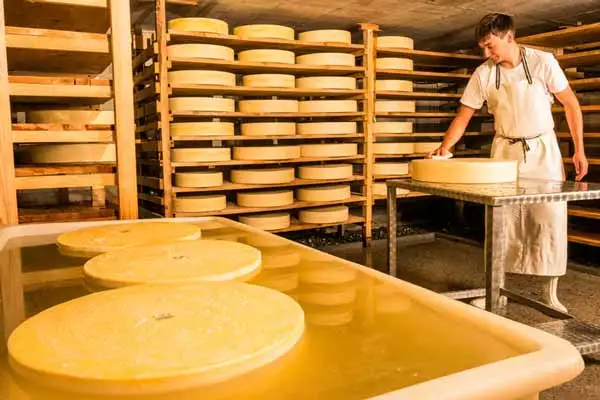
Cheesemaking can be a satisfying and fun hobby, but beyond that, it can provide an income as well. In certain expat havens in Latin America, good cheese is in high demand.
The basic process for most cheeses is the same: warm the milk, add certain bacterial cultures, consolidate the curd, press it, age it….and voila, you have cheese. But don’t be fooled; that process takes all day long and even the subtlest variations in any of those steps result in drastically different cheeses.
Become a Life Coach
Life coaching is a thought-provoking and creative process that helps people focus on both personal and professional goals. It’s typically an “evocative” process—meaning it’s the life coach’s job to draw out the answers from the client, rather than tell them what to do. People use life coaching to overcome fears, boost their self-confidence, create goals, and instill success-oriented habits.
There are thousands of coaching training programs available online and in person. Many coaching certification programs offer an entire website setup once training is completed.
Consider Pet Sitting
Most expats have at least one animal—many have more than one. Every expat wants to visit family from time to time or vacation. A dog hotel, where their pets are properly looked after, gives them the freedom to do so without worrying about their pets.
Overheads for this type of business are relatively low. But there are some regular costs you should be aware of, including food, beds, toys, and air conditioning.
Become an Audiobook Narrator
Audiobooks are an increasingly popular form of entertainment. The convenience factor of smartphones has led to an industry boom. The Association of American Publishers reported a 38.1% increase in audiobook downloads in 2015…and that’s creating a demand for freelance narrators.
Narration is a job that anyone can do, regardless of age or experience. Whether you’re just looking to make some extra money or fund a life of travel, freelance narration might be the income for you. It’s flexible, portable, and, above all, fun.
Rent Out a Co-Working Space
Creating a co-working space is one way to cater to workers on the go. In a nutshell you find a space with reliable internet. Then add in some office equipment like printers, copiers, scanners, maybe a 3D printer, as well as some comfortable furniture (think ergonomic chairs and cozy couches). Then rent out desk space.
If you chose the right location, you can turn a tidy profit and find yourself at the center of a creative entrepreneurial hub meeting new and interesting people all the time.
Set up an Online Course

Here’s an alternative to writing an e-book or creating “how to” videos. Why not create a full-fledged online course, made up of written tutorials, PDF downloads, and videos? This could be made available through the membership area of a dedicated website.
Members can go at their own pace and post questions related to the course in a dedicated group. Students will then be able to navigate through the course in whatever way they want—depending on the challenges they face or projects they’re working on.
Provide a Catering Service
All over the world there are expat communities feeling nostalgic for apple pie, hamburgers, pork and beans, bagels, and the hundreds of regional foods from their home states. From a business perspective, each one presents a new opportunity.
Many Central and South American counties simply don’t have the same bakery tradition as the U.S. or Europe, which means you can find a hungry market for U.S. and European-style loaves, pastries, wholegrain, sourdough, and croissants in most expat towns.
There is also a market for home delivered foods for seniors who could no longer easily prepare meals or get out to shop, and for expats who didn’t cook and wanted meals delivered.
Internet Research
There’s a way to make good money—cold hard cash—surfing the Internet in your spare time. In fact, there’s an entire industry that wants to pay you up to $50 an hour…And all you have to do is sit at home and check out websites.
Not just any websites, of course…These people tell you exactly what they need. You just look it up for them, e-mail it to them…And get paid. If you’re looking for a way to make an extra $1,000, $2,000 a month part-time, in just an hour or so, a few evenings a week, or perhaps want a new career that you can do from anywhere in the world, then Internet research is for you.
7 Incredible Housesits for a Bucket-List Vacation
7 Incredible Housesits for a Bucket-List Vacation
Whether you want to explore retirement destinations like Portugal, Mexico or Costa Rica… see more of your own country… or have a vacation and save money… Housesitting allows you to have the lifestyle experiences you want—often for less than it costs to live at home.
Discover 7 Incredible Housesits and amazing destinations in our daily postcard e-letter. Simply enter your email address below and we’ll send you a free special report – Your Trusted Guide to 7 Incredible Housesits Where You Could Enjoy a Bucket-List Vacation
By submitting your email address, you will receive a free subscription to IL Postcards and special offers from International Living and our affiliates. You can unsubscribe at any time, and we encourage you to read more about our Privacy Policy.
Turn your Craft Skills into a Scalable Income
What can you make from glue sticks, balls of wool, and some colored paper? A lot more than you might think. Arts and crafts aren’t just the domain of grandmothers knitting scarves in front of the television, or children with glitter caked to their face.
According to the Association for Creative Industries, the U.S. creative industry is now worth $43.9 billion, a 45% increase from their last study from 2011. For expats in search of new ways to make money overseas, this renewed demand for handmade crafts spells opportunity.
Set up Your own Home-Maintenance Service
Some retired expats may not be physically able to do these tasks or may lack appropriate tools. Or they simply may not want too, now that they are retired. More and more single women are moving here and may need an extra pair of hands or a strong back now and then.
Simple jobs include hanging curtain rods or pictures, replacing or installing light fixtures or ceiling fans, and washing windows. More demanding jobs might be interior or exterior house painting, tile repair, ceiling or roof repairs, plumbing work, and light carpentry.
Set up a Vegan Restaurant

Far from being a niche fad, veganism is now well-established across the world. And its growth remains substantial. In the last three years alone, there has been a 600% increase in people identifying as vegans in the U.S.—6% of all U.S. consumers. The rest of the developed world is seeing a similar shift.
Anyone offering a restaurant, café, food store, or product that caters to the growing vegan community or the multitudes of tourists with vegan preferences could create a profitable business overseas.
Related Articles
Living Internationally: How to Enjoy a Roving Retirement